How to Enter a Match Result
Summary
There are 2 very simple ways to enter match results either via the player home page or via the competition home page.
Once a result is entered the competition standings will automatically be updated.
Enter match result via player home page
Goto player home
First click on the home button:

Select match
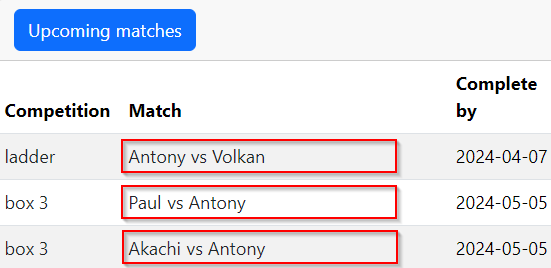
You will then see the Upcoming matches section on the home page:
Select winner
Click the match you wish to enter the result for highlighted in red.

Enter score
From here select the winner by pressing the blue or grey button.

Submit results
Simply type the scores into the boxes provided and press Add match result

Enter a match result via competition home
Goto player home
First goto the player home page (or the competitions page) via the home button:
View competition
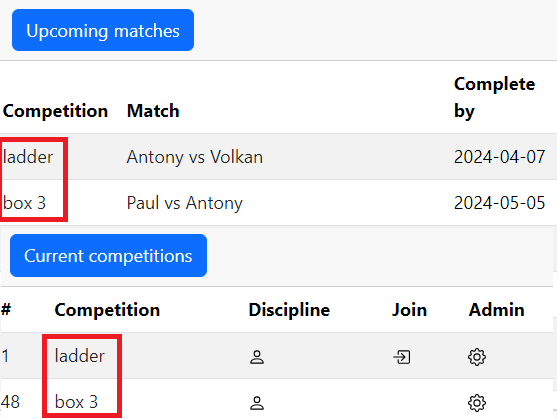
From here you can view any competition from the Upcoming matches pane or the Competitions pane:
Competition home page
Once here you will see the competition home page:

Competition menu
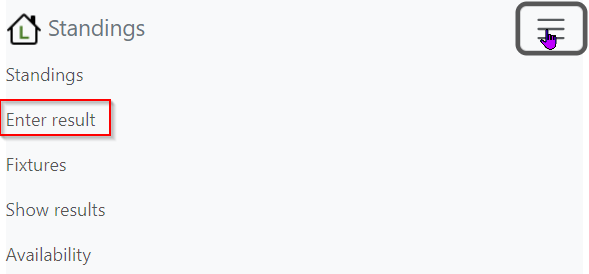
Click the burger menu button to view the competition menu:

View menu
A menu will be displayed:
Enter result
Now click the Enter result option and follow instructions from here